| General |
Directory Structure |
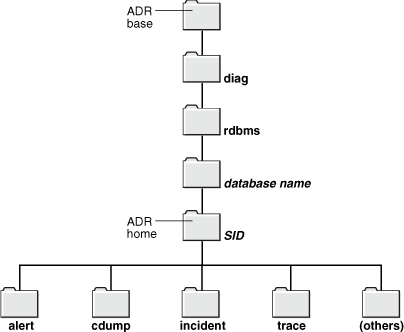 |
| Queries |
set linesize
121
col value format a75
SELECT *
FROM gv$diag_info; |
| |
| ADRCI |
Purpose |
The ADR Command Interpreter (ADRCI) is a command-line tool that you use to manage Oracle Database diagnostic data.
ADRCI is a command-line tool that is part of the fault diagnosability infrastructure introduced in Oracle Database Release 11g. ADRCI enables:
- Viewing diagnostic data within the Automatic Diagnostic Repository
(ADR).
- Viewing Health Monitor reports.
- Packaging of incident and problem information into a zip file for transmission to Oracle Support.
Diagnostic data includes incident and problem descriptions, trace files, dumps, health monitor reports, alert log entries, and more.
ADRCI has a rich command set, and can be used in interactive mode or within scripts. In addition, ADRCI can execute scripts of ADRCI commands in the same way that SQL*Plus executes scripts of SQL and PL/SQL commands.
ADR data is secured by operating system permissions on the ADR directories, hence there is no need to log in to ADRCI.
|
|
CREATE REPORT |
create report <report_type> <report_id> |
SELECT run_id, name, check_name, run_mode, status, error_number
FROM gv$hm_run;
adrci> set homepath diag dbms\orabase\orabase
adrci> create report hm_run HM_RUN_1
adrci> show report hm_run hm_run_1 |
|
ECHO |
echo <ON | OFF> |
ardci> echo on
ardci> echo off |
|
EXIT |
exit |
$ ardrci
adrci> exit |
|
HELP |
help |
|
adrci> help |
|
HOST |
host |
$ ardrci
adrci> host
Microsoft Windows XP [Version 5.1.2600]
(C) Copyright 1985-2001 Microsoft Corp.
-- then exits back to the command prompt |
|
IPS CREATE PACKAGE INCIDENT |
ips create package incident <incident_number>
[CORRELATE <BASIC | TYPICAL | ALL>] |
|
adrci> ips create package incident 2 |
|
IPS CREATE PACKAGE PROBLEM |
ips create package problem <problem_id>
[CORRELATE <BASIC | TYPICAL | ALL>] |
|
adrci> ips create package problem ? |
IPS CREATE PACKAGE PROBLEMKEY |
ips create package problemkey <'problem_key'>
[CORRELATE <BASIC | TYPICAL | ALL>]
ips create package problemkey <"problem_key">
[CORRELATE <BASIC | TYPICAL | ALL>] |
adrci> ips create package problemkey '?'
adrci> ips create package problemkey "?" |
|
IPS CREATE PACKAGE SECONDS |
ips create package seconds <sec> [CORRELATE <BASIC |
TYPICAL | ALL>] |
|
adrci> ips create package seconds 600 CORRELATE
ALL |
|
IPS CREATE PACKAGE TIME |
ips create package time <'start_timestamp'> TO
<'end_timestamp'>
[CORRELATE <BASIC | TYPICAL | ALL>] |
|
adrci> ips create package time '2008-01-01
00:00:00 -08:00' to '2008-01-02 23.59.59 -08:00' |
|
IPS GENERATE PACKAGE |
ips generate package |
|
adrci> ips generate package |
|
IPS SHOW |
ips show incidents package pkg_id |
|
adrci> ips show incidents package 3 |
|
IPS UNPACK |
ips unpack file file_name [into path] |
adrci> ips unpack file
/home/oracle/ORA603_20060906165316_COM_1.zip
into /tmp/newadr |
|
PURGE |
purge [[-i {id1 | start_id end_id}] [-age mins]
[-type {ALERT|INCIDENT|TRACE|CDUMP|HM}] |
adrci> purge -i 123 456
adrci> purge -age 60 -type incident |
|
QUIT |
quit |
$ ardrci
adrci> quit |
RUN |
run script_name
@ script_name
@@ script_name |
-- need to create a demo script
here
adrci> run uwadrscript |
|
SET BASE |
set base base_str |
|
adrci> set base
/apps/oracle/product |
|
SET BROWSER |
set browser browser_program |
|
adrci> set browser
firefox |
|
SET CONTROL |
set control (<SHORTP_POLICY | LONGP_POLICY> = value, ...) |
|
adrci> set control (SHORTP_POLICY = 360) |
|
SET ECHO |
set echo <ON | OFF> |
|
adrci> set echo off |
|
SET EDITOR |
set editor editor_program |
|
adrci> set editor vi |
SET HOME |
set home <home_location> |
adrci> show homes
adrci> set home diag dbms\orabase\orabase
adrci> show home |
SET HOMES |
set homes <home_location1>, <home_location2>, ... |
adrci> show homes
adrci> set homes diag dbms\orabase\orabase, diag nslsnr\perrito2\listener
adrci> show homes |
SET HOMEPATH |
set homepath homepath_str1 [homepath_str2] [...] |
adrci> show homepath
adrci> set homepath diag dbms\orabase\orabase
adrci> show homepath
|
|
SET TERMOUT |
termout <ON | OFF> |
adrci> set termout on
adrci> set termout off |
SHOW ALERT |
show alert [-p predicate_string] [-tail [num] [-f]] [-term]
[-file alert_file_name]
|
$ adrci exec="show homes; show incident"
adrci> show alert
Choose the alert log from the following homes to view:
1. diag\client\user_unknown\host_411310321_11
2. diag dbms\orabase\orabase
3. diag nslsnr\perrito2\listener
Q: to quit
Q
$ adrci
adrci> set home diag dbms\orabase\orabase
adrci> show alert |
Tail the Alert Log |
-- open a terminal window
adrci> show home
adrci> set homepath diag dbms\orabase\orabase
adrci> show alert -tail -f
-- to verify
SQL> ALTER SYSTEM SWITCH LOGFILE; |
|
SHOW BASE |
show base |
adrci> show base
ADR base is "c:\oracle\product" |
|
SHOW CONTROL |
show control
|
adrci> set homepath diag dbms\orabase\orabase
adrci> show control |
|
SHOW HM_RUN |
show hm_run [-p predicate_string] |
|
adrci> show hm_run |
|
SHOW HOME |
show home |
|
adrci> show home |
|
SHOW HOMES |
show homes |
|
adrci> show homes |
|
SHOW HOMEPATH |
show homepath |
|
adrci> show homepath |
|
SHOW INCDIR |
show incdir [id | id_low id_high] |
|
adrci> show incdir |
SHOW INCIDENT |
show incident -p predicate_string [-mode {BASIC|BRIEF|DETAIL}]
[-orderby field1, field2, ...] [ASC|DSC]
|
|
adrci> show incident |
SHOW PROBLEM |
show problem [-p predicate_string] [-last num | -all]
[-orderby field1, field2, ...] [ASC|DSC]]
|
|
adrci> show problem |
SHOW REPORT |
show report report_type run_name |
-- need to define a single home
conn / as sysdba
SELECT run_id, name, check_name, run_mode, status, error_number
FROM gv$hm_run;
adrci> set homepath diag dbms\orabase\orabase
adrci> show report hm_run hm_run_1
|
SET TRACEFILE |
show tracefile [file1 file2 ...] [-rt | -t] [-i inc1 inc2 ...]
[-path path1 path2 ...] |
adrci> show tracefile %mmon%
-rt
adrci> show tracefile -i 1 4 -path diag/rdbms/orabase/orabase |
SPOOL |
SPOOL filename [[APPEND] | [OFF]]
spool file_name_and_path [<APPEND | OFF>] |
adrci> spool c: emp est.txt
adrci> spool off |
| |
| Demo |
|
ADRCI Demo |
SQL> conn / as sysdba
SQL> desc gv$hm_run
SQL> select run_id, name, check_name, run_mode, status, error_number
from gv$hm_run; |
